 Joripo
Form design
Design in XLSForm, test in the browser, deploy in one step.
Joripo compiles your XLSForm itself, checks that it opens, and makes it live for Joripo Collect, ODK Collect and web forms together. If a workbook has problems, you see every one of them by sheet, row and column, and the form in the field stays as it was.
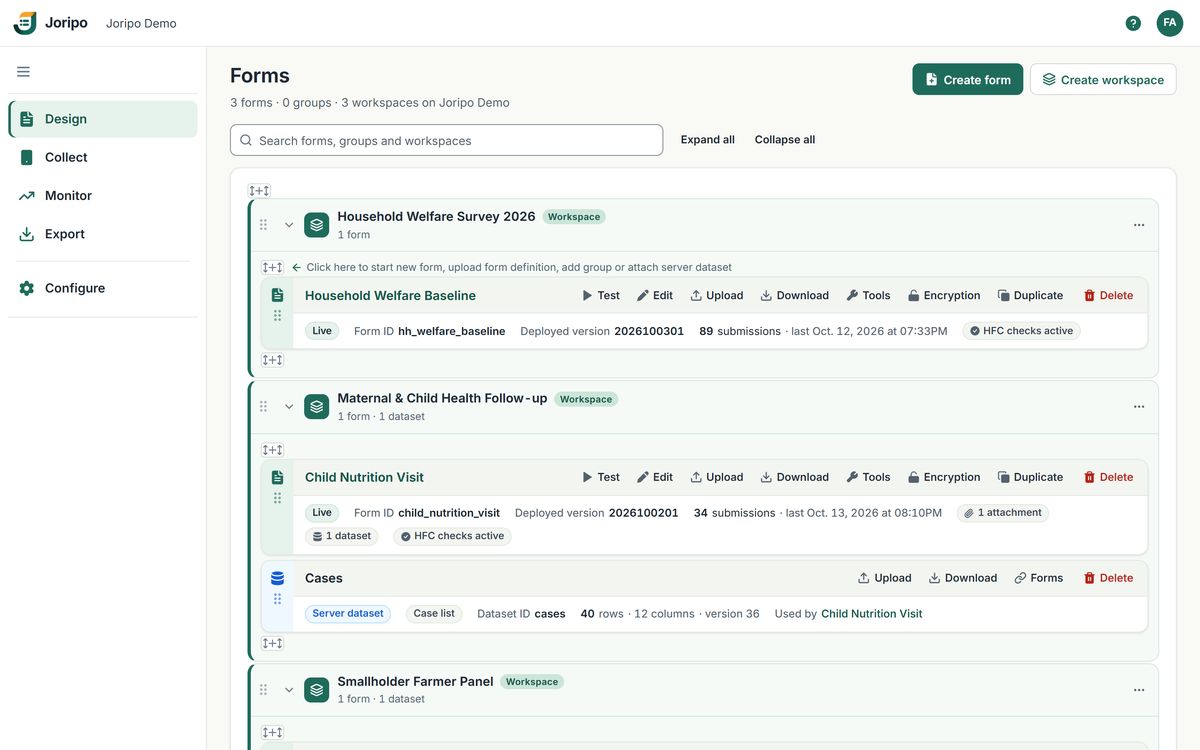
Joripo's console, showing a demo workspace with synthetic data.
Bring the forms you have
Reads the XLSForms you already use.
Joripo has its own XLSForm compiler, which reads SurveyCTO-compatible and ODK workbooks. In most cases you can upload the workbook your team already uses, then test it in the browser to be sure before fieldwork.
49 question types
34 carried over as they are, 15 translated or recorded by the compiler.
94 functions catalogued
55 run natively in the engine, 24 are rewritten to standard XPath, 11 run in Joripo's runtime and 4 return constants in web forms.
25 survey-sheet columns
Relevance, constraints, calculations, choice filters, appearances and the rest, plus 7 settings keys.
One step to deploy
Compile, check and go live happen together, so a form is never left half deployed.
public_key (encrypted forms) are refused. Eleven functions, such as count-items and format-number, work in Joripo Collect, web forms and the tester but not in ODK Collect, and the upload tells you when a form uses them. hash() gives values of its own. A few appearances are partial (month, organized-closed, annotate, and maps for geotrace and geoshape), and passive sensor fields stay blank. Workbooks must be .xlsx or .xlsm.A workbook with problems is refused, with every problem listed.
You do not fix one error, upload again and meet the next. The Error uploading form dialog lists each problem with its sheet, row and column, a Copy button for passing the list to whoever owns the workbook, and the technical details folded away until you need them.
- Duplicate field names, broken expressions and unclosed groups found in one pass
- A warning when a
pulldata()file has not been attached - The form already in the field keeps running while you fix the workbook
- Upload the workbookAn .xlsx or .xlsm, with its images, audio, preload files and field plug-ins, or a .zip of them.
- Joripo compiles itThe XLSForm is turned into an XForm by Joripo's own compiler.
- The engine opens itJoripo checks that its form engine can actually load the result, as a phone would.
- It goes live, or nothing changesPhones and web forms get the form in one atomic step. If anything failed, the live form is untouched.
Form Designer
Change a deployed form in the browser.
Open any deployed form as field cards, or switch to the Spreadsheet view and edit the survey, choices and settings sheets directly. Both views edit the same workbook, and unknown columns are kept as they are.
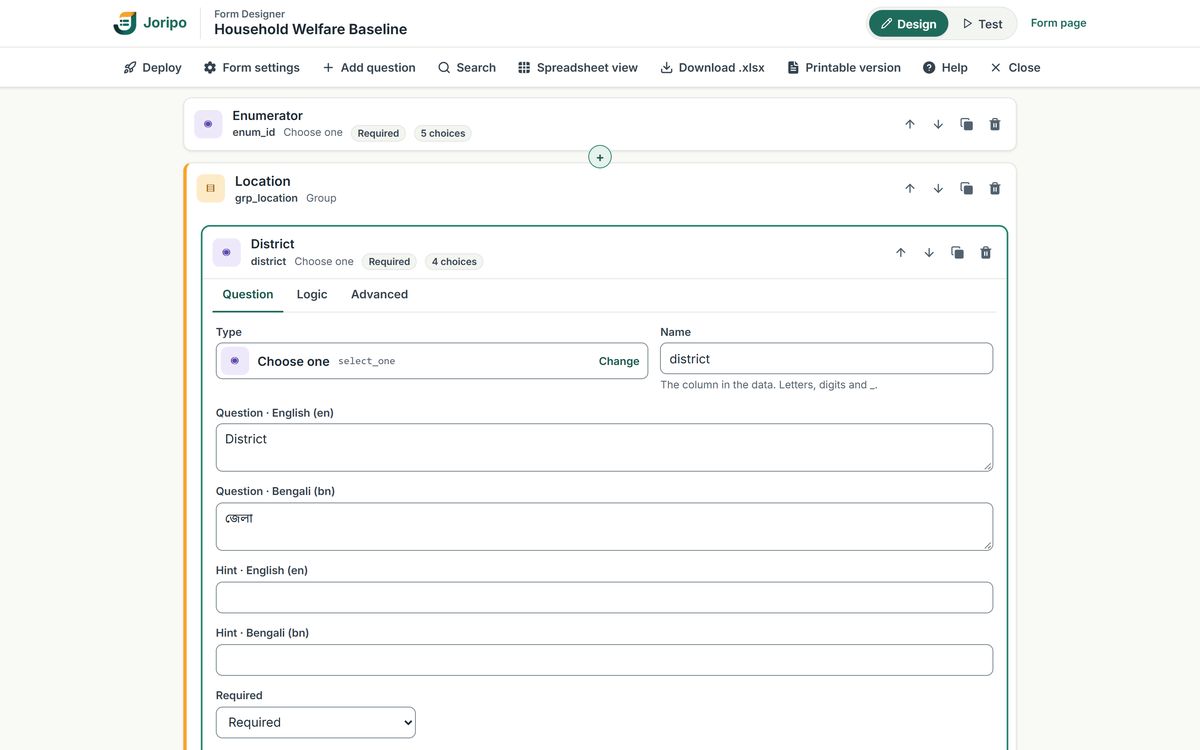
- Deploy publishes a new version
Through the same compile and engine checks as an upload, with the version number raised for you. There are no drafts: every deploy goes live.
- Spreadsheet view for bulk edits
The survey, choices and settings sheets in a grid, for changes that are quicker by the row.
- Insert anywhere
17 insert types, groups and repeats included, at any position in the form.
- Every property of a field
Move a field up or down, duplicate or delete it, and set labels and hints per language, choices, relevance, constraints, calculations, choice filters, defaults and media. Logic is typed as expressions.
Testing
Test the exact form your enumerators will get.
Test opens the deployed form in your browser on the same engine and the same form definition as Joripo Collect and web forms: ODK's open-source XForms engine, extended by Joripo. What you check at your desk is what runs on the phone.
- One screen at a time, with validation on Next, Go to and a language switch
- The Form inspector shows each field's type, relevance, constraint and value, the fields being skipped and every calculated value
- Named test sessions saved on the server, to resume and manage later
- Photos, recordings and files can be attached, and field plug-ins run
- Validate form, Skip to next, Start over, and Reload with updated form without losing your answers
- Owners and managers can submit a test as data, marked as coming from the tester, or discard it
The tester runs the deployed version and does not record audio audits.
Versions and files
Every version kept, with who deployed it and when.
Publish a new version from the form's own Upload. The version must be a whole number higher than the one deployed, with the same number of digits; a workbook without a version gets a date-time one. Exports keep the data from older versions, so a field you later remove keeps its answers.
- Download any version's workbook exactly as uploaded, and the XForm that phones received
- See the attachment packages each version shipped, and download every current attachment as one .zip
- Open a printable version: the whole form as one outline of groups, repeats, logic and choice lists
- Generate questionnaire (.docx) for ethics review, translation and enumerator training
There is no one-click rollback. To go back, download an earlier workbook, raise its version and upload it.
What each version keeps
| Workbook | The .xlsx exactly as it was uploaded |
|---|---|
| XForm | The compiled form that phones and web forms received |
| Who and when | The person who deployed it, and the time |
| Attachments | The media and data packages that version shipped |
A print-ready questionnaire, in one language or all.
Generate questionnaire builds a Word document from the deployed form. Each section becomes a table of Variable, Question, Response / Codes and Skip / Logic. Choices read 1 = Yes, skip logic reads "Ask if a3 = 1 (Yes)", and enumerator instructions sit in [brackets].
- Fields recorded automatically listed together in one block
- Calculations in an annex, and choice lists longer than 40 in a code-list annex
- Small repeat groups drawn as roster grids
- Constraints left out by design, so the document reads as an interview
Multilingual forms, Bangla included.
Write labels, hints, media and constraint and required messages per language, with label:Bangla or label::Bangla, and set which opens first with default_language.
- Enumerators and respondents switch language on the form screen, in Joripo Collect, web forms and the tester
- Add a language from the Form Designer
- Questionnaires and exports labelled in any of the form's languages
- Bangla text, digits and column names handled, with a Bangla font bundled
Forms can be in any language. The console itself is in English.
Server datasets and preloads
Look up and preload data from tables on the server.
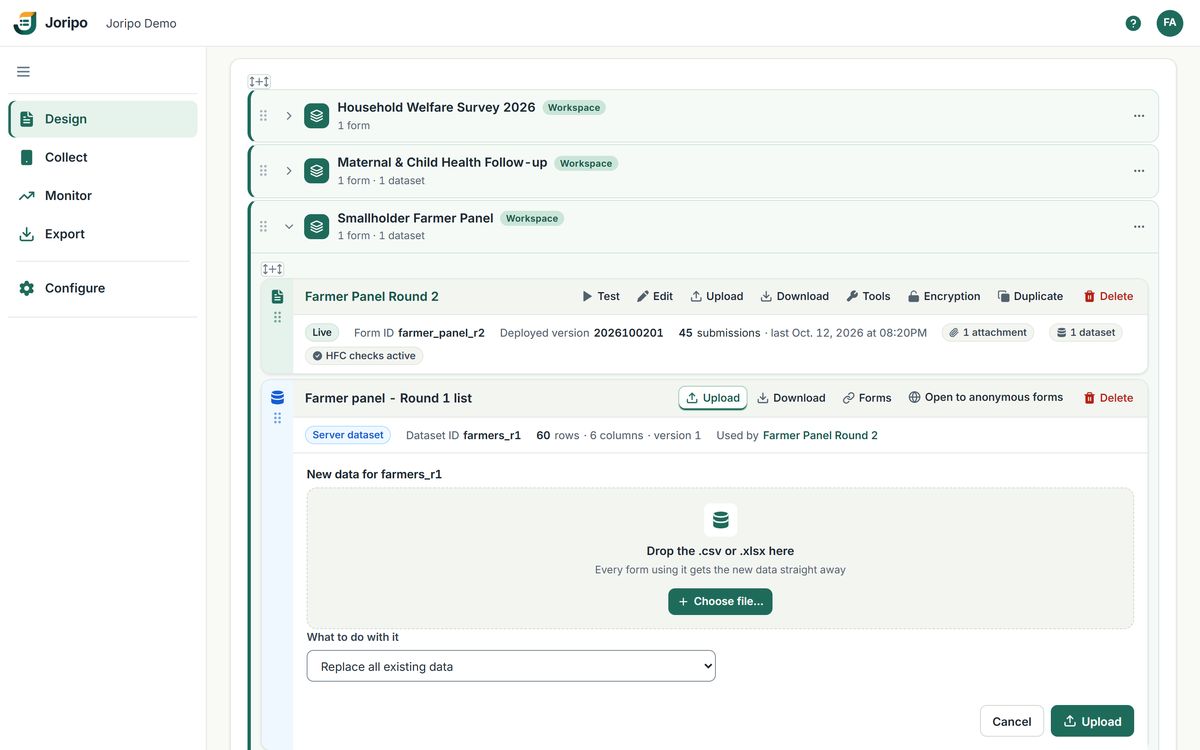
A server dataset is a table kept on the server and attached to any number of forms. Create one from a .csv or .xlsx, with an optional Unique ID column whose values must be present and unique. Every form it is attached to gets new data at once, and phones pick it up on their next refresh.
pulldata()preloads,search()with its full signature, andselect_one_externalchoice lists- New data can replace all existing data, add its rows, or merge on a column
- Download a dataset, detach it from a form, or delete it once nothing uses it
- Plain .csv and media attachments work too, for forms that carry their own files
Organising forms
One page for every form your organisation runs.
Forms home is where signing in lands: a collapsible tree of workspaces, groups and forms, with a search that narrows it as you type. Each form card shows whether it is Live, its submissions, the last submission time and its attachments, with Test, Edit, Upload, Download and More beside it.
Forms can also sit outside any workspace, open to every internal member of the organisation. The order you set with up and down moves is the order phones list forms in.
Insert where you mean it
+ handles above, between and under items: start a new form, upload a form definition, add a group, add a server dataset or create a workspace at that spot.
Move without losing anything
Drag a form or group to another group or workspace, or use Move to. The form takes its versions, attachments, submissions, quality findings and privacy settings with it.
Duplicate a form
Copy a deployed form under a new form ID with its attachments and dataset links, ready to test straight away.
Deleted forms, restorable
Delete moves a form and its submissions to Deleted forms, and restore brings them back with their reviews. A form with more than 10 submissions needs that number typed to confirm.
Questions
About designing forms in Joripo
Will the forms we already have work?
Usually, yes. Joripo reads XLSForm workbooks, SurveyCTO-compatible ones and their functions included, and the upload lists anything it cannot handle. Test the form in the browser before fieldwork to be sure. The exceptions to know about are listed above: encrypted forms are refused, a few functions do not run in ODK Collect, and some appearances are partial.
Can we prepare a new version without it going live?
Not today. Every upload and every Form Designer deploy goes live at once, and the tester runs the deployed version. Every earlier version is kept, so you can download a previous workbook and upload it again with a higher version. To try a large change first, duplicate the form, change and test the copy, then upload the finished workbook to the original. The copy counts towards your plan's forms.
Is there a drag-and-drop form builder?
Joripo is built around XLSForm. The Form Designer edits a deployed form as field cards or as a spreadsheet, with move buttons and logic typed as expressions, and the quick builder makes simple new forms in 8 question types. Drag and drop is used for organising forms, groups and workspaces on Forms home.
Can we upload a Google Sheet or an old .xls file?
Joripo takes .xlsx and .xlsm workbooks. Download a Google Sheet as .xlsx, or save an .xls file as .xlsx in Excel, and upload that.
Can our team use Joripo in Bangla?
Your forms can be in Bangla, or in several languages at once, in Joripo Collect, web forms, the tester, questionnaires and exports. The console your managers and reviewers use is in English.
Bring a form you already use.
Send us an XLSForm from a current or past study and we will show you how it compiles, tests and deploys in Joripo, and flag anything that needs a change.
Already using Joripo? Log in to your server.