 Joripo
High frequency checks, built in
Catch data problems while the team is still in the field.
Joripo runs high frequency checks inside the platform. Twelve checks look at each interview as it reaches the server. Sixteen more compare enumerators, test distributions and match back-checks across a whole form whenever you run them. Every finding says what was entered, what was expected and who collected it.
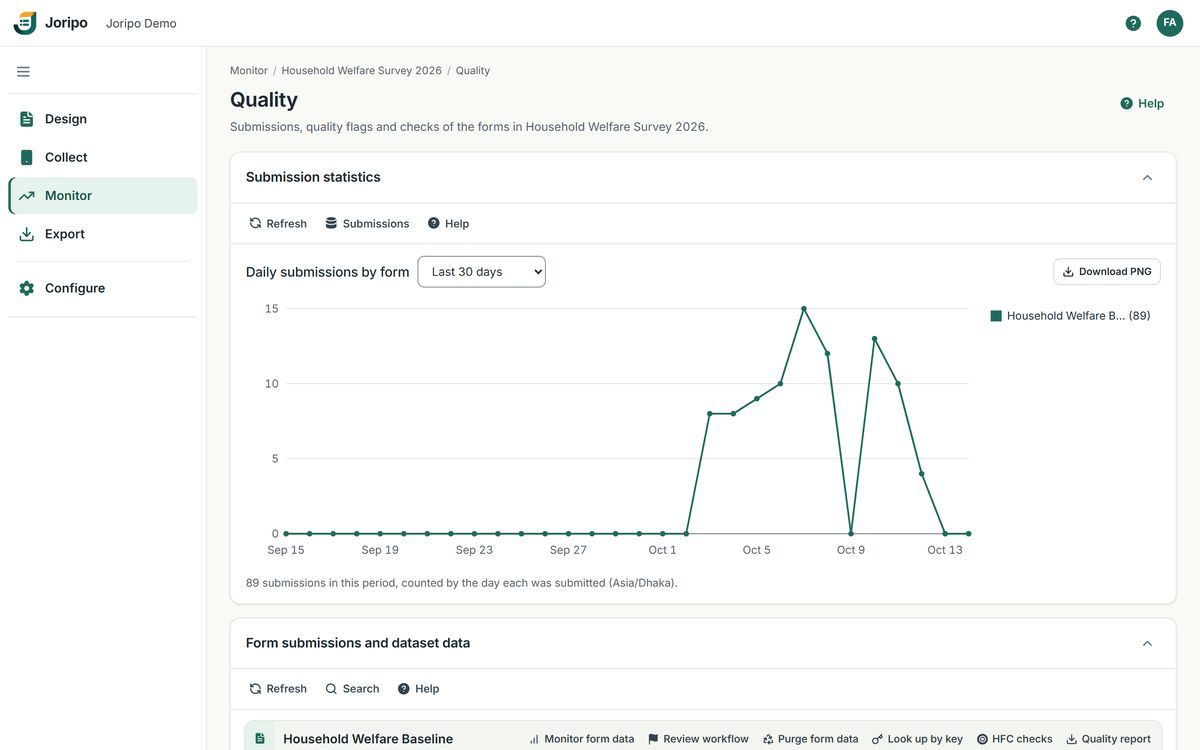
Joripo's console, showing a demo workspace with synthetic data.
On arrival and on demand
Some problems show in one interview. Others only show across hundreds.
A rushed interview or a broken skip pattern can be judged on its own. An enumerator who is consistently faster than colleagues, or a column of amounts that fails Benford's law, only appears when you look across the whole dataset. Joripo treats the two differently, and tells you which is which.
-
12 checks on every interview, as it arrives
Duration, GPS, straightlining, don't know and refused answers, skip patterns, travel speed, missing answers, fieldwork hours, late upload, contradictory answers, value ranges and repeat counts. They run on submissions from Joripo Collect, ODK Collect, web forms and imported phone files, and each runs separately, so one failing check never holds up the others or the submission.
-
16 checks across a whole form, when you choose
Productivity, comparisons with peers, back-checks, Benford's law, duplicates, outliers, digit heaping and sample coverage need the whole dataset. An owner or manager ticks the checks and runs them over everything a form has collected so far. They do not run on a schedule.
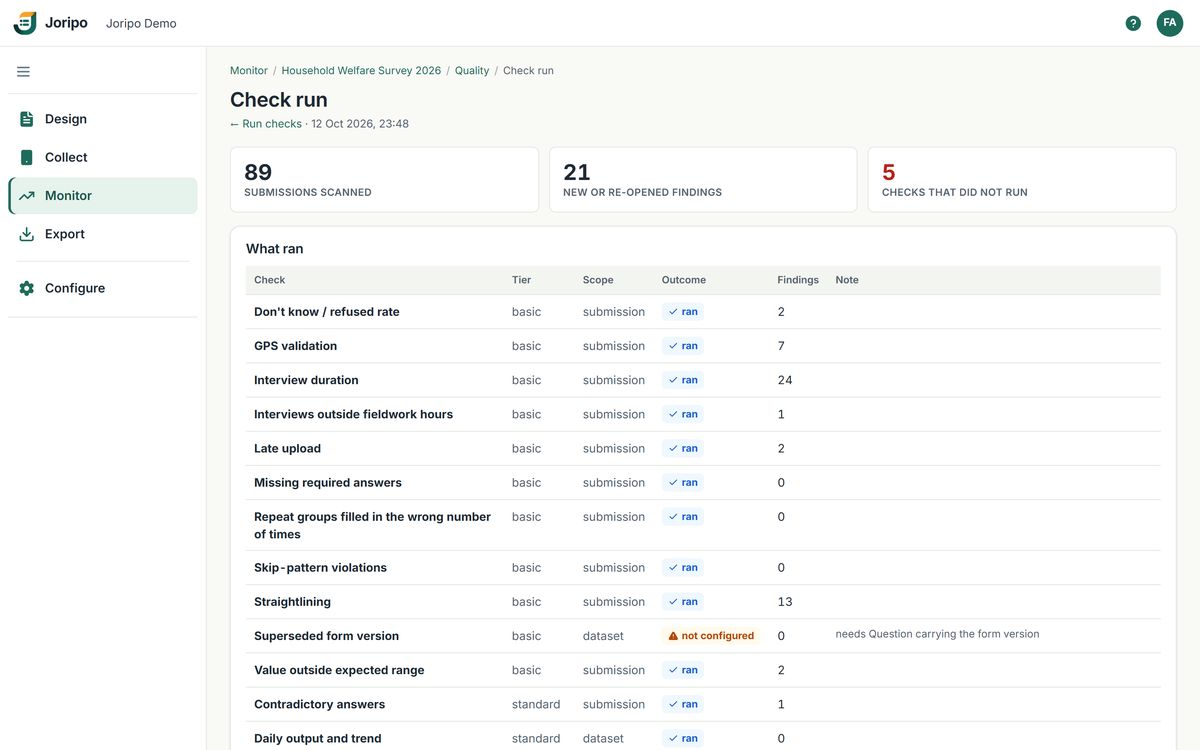
- Scope on every line
A check run lists each selected check with its tier and whether it reads one submission or the whole dataset.
- Nothing fails silently
A check missing an input says "not configured" and names the question it needs. No findings only ever means checked and found nothing.
- A summary of the run
Submissions scanned, new or re-opened findings, and checks that did not run. Runs never duplicate findings already on record, and download as Excel.
Every finding records the version of the rule-set and the thresholds it was raised under, so it can be explained later even if the settings have changed.
The catalogue
28 checks, from interview length to Benford's law.
The checks are grouped in three tiers. Each one is marked with when it runs: on arrival, or on demand across the form. Paid plans run every check on every submission; the Free plan runs them on its first 200 submissions a month.
Basic: 11 checks
The checks most surveys switch on first. Ten of them run on every interview as it arrives.
Interview duration
Interviews far faster or slower than the survey's own median (below 0.5× or above 2× once 30 interviews exist), or outside a fixed minimum and maximum.
On arrival
GPS validation
Missing, inaccurate, outside the survey area, or within 10 m of another household's point.
On arrival
Straightlining
The same answer given down a battery of scale questions.
On arrival
Don't know / refused rate
Interviews where too much of the questionnaire went unanswered (15% by default).
On arrival
Skip-pattern violations
Questions answered that should have been skipped, or the reverse.
On arrival
Missing required answers
Interviews arriving without an answer the analysis needs.
On arrival
Interviews outside fieldwork hours
Interviews starting outside set hours, 6:00 to 20:00 workspace time by default.
On arrival
Late upload
Interviews sent long after they finished, 48 hours by default.
On arrival
Value outside expected range
Numeric answers outside the range you expect (soft bounds) or that is possible at all (hard bounds).
On arrival
Repeat groups filled the wrong number of times
A roster with too few or too many entries, or not as many as the interview said there would be.
On arrival
Superseded form version
Interviews still arriving on a form version that has been replaced.
On demand
Standard: 7 checks
Checks that look at the team's output and at the spread of answers. Two run on arrival; five compare across the whole form.
Impossible travel speed
Consecutive interviews by one enumerator too far apart for the time between them (faster than 120 km/h by default).
On arrival
Contradictory answers
Answers that are each valid alone but cannot both be true, such as a child born before their mother. Rules can combine several conditions, including dates and times.
On arrival
Enumerator productivity
More interviews by one enumerator on one day than is plausible.
On demand
Daily output and trend
Enumerator-days below target, and output falling away over the weeks.
On demand
Numeric outliers
Answers far outside the distribution the survey produced, 3 standard deviations by default.
On demand
Question non-response
Questions much of the sample would not or could not answer, with blank answers counted apart from don't know and refused.
On demand
Duplicate household IDs
The same identifier submitted more than once, with a link to the matched interview.
On demand
Advanced: 10 checks
Statistical and comparative checks, all run on demand across the form. Peer checks compare each enumerator with the rest of the team, not with a team average that includes them (2 standard deviations by default).
Back-check comparison
Answers from a back-check visit compared with the original interview, per question, enumerator and back-checker.
On demand
Benford's law
A chi-square test of the leading digits of the amount questions you choose, giving one finding for the form.
On demand
Fuzzy duplicate answers
Near-identical open-ended answers across interviews, naming the earlier interview matched.
On demand
Enumerator duration vs peers
Enumerators whose interviews are far shorter or longer than their colleagues'.
On demand
Don't know / refused vs peers
Enumerators recording far more, or far fewer, non-answers than the rest of the team.
On demand
Flag rate vs peers
Enumerators whose interviews keep coming back flagged by the other checks.
On demand
Digit preference (heaping)
Numbers clustering on 0 and 5, such as ages and amounts rounded by guesswork.
On demand
Same respondent, different IDs
One person, by phone number, name or national ID, recorded under several households.
On demand
Screening-out rate vs peers
Enumerators finding far more households ineligible than their colleagues do.
On demand
Sample coverage
Sampled units with no interview, and interviews whose ID is not on your uploaded sample list, optionally by cluster or ward.
On demand
Findings and review
Findings a field supervisor can act on the same day.
Each finding names the check, its severity (info, warning or critical) and the enumerator, and says in plain words which question was involved, what was entered and what was expected. Analysts can unfold the technical details; supervisors do not have to.
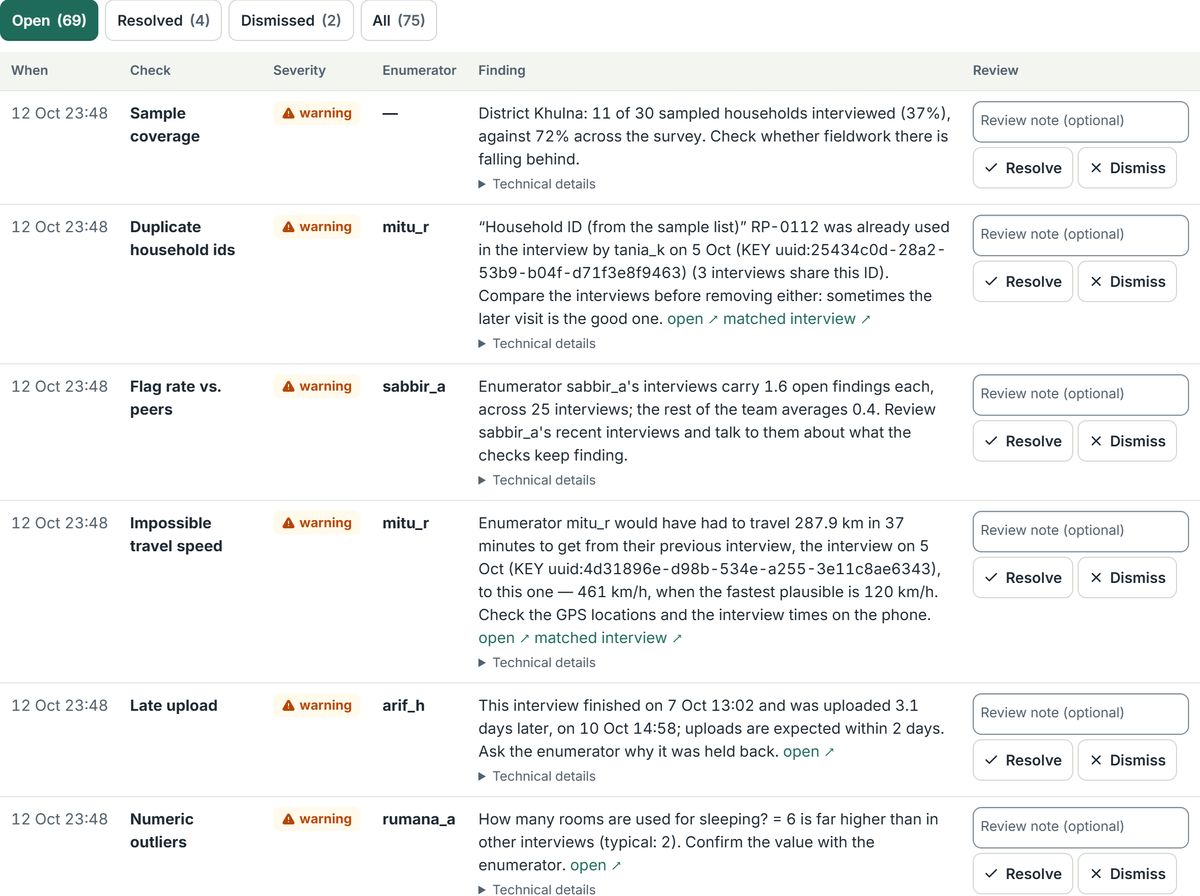
- Open, resolved, dismissed
Filter the list by status. It shows 50 findings a page and refreshes every 15 seconds, pausing while you type a note.
- Plain words first
What was entered, what was expected, and what to check next, beside the check, its severity and the enumerator.
- The other interview
Findings about duplicates link to the matched interview. Technical details, folded away, give the variable, statistic, rule and rule-set version.
- A decision with a note
Resolve means dealt with; Dismiss means not a problem. Each decision is kept with who made it, when, and the note.
Every interview, with its findings beside the answers.
Open a submission to read every answer, play its audio audit, follow a link to where it was recorded on OpenStreetMap, and settle the findings raised on it with Resolve, Dismiss or Re-open.
- A dismissed finding re-opens only if its measure becomes at least 1.5 times worse, or it newly crosses a hard limit
- A resolved finding about an enumerator or the form re-opens only if the problem recurs in newer interviews
- A re-opened finding is the same finding, marked "Re-opened by the checks", with the reason and its full review history
- When one problem appears on at least half of a form's interviews (and at least 30), a run collapses it into one finding with the count
- Funders given quality access see a finding's status and date, never the reviewer's name or notes
n_flags column in the export.Field supervision
Know which enumerator to call first.
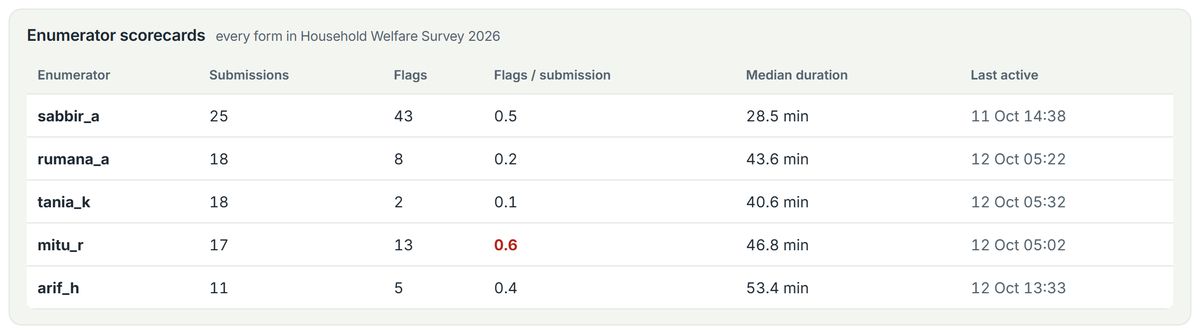
The Enumerators panel lists everyone collecting in the workspace with their submissions, number of findings, the share of interviews flagged, median interview duration and when they were last active. A share above one half is shown in red.
- Peer checks set each enumerator's duration, don't know and refused answers, flag rate and screening-out rate against the rest of the team
- Each enumerator is compared with colleagues, not with an average that includes their own interviews
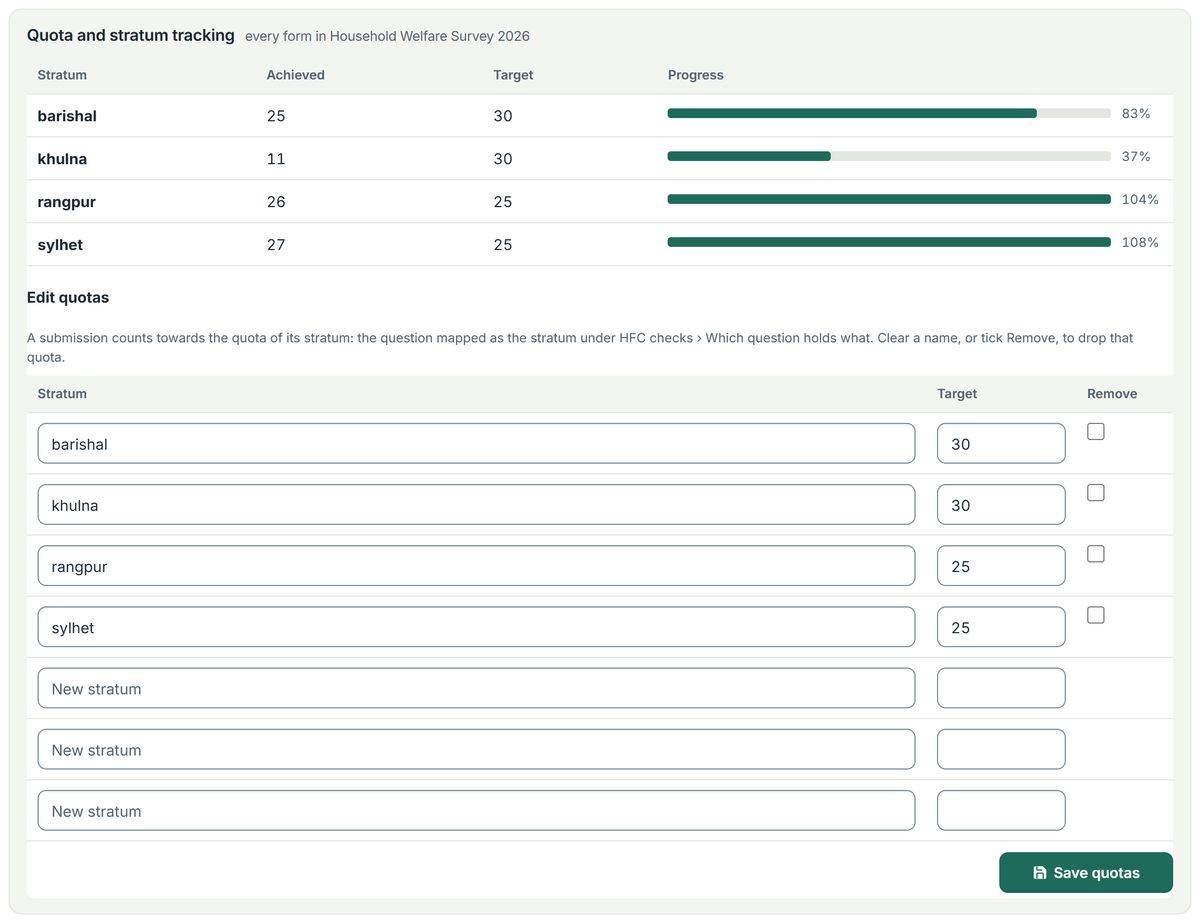
- Quota and stratum tracking shows achieved against target for each stratum, with progress bars
- Owners and managers edit targets in place, choosing from strata already seen in submissions
Quotas follow one stratum question and count every form in the workspace together. They are a progress view, not a limit enforced on phones.
Configuration
Set up the checks without writing code.
Each form has its own rule-set, with a workspace default to fall back on. The settings screen is built from what each check needs: question pickers filtered by type, thresholds with defaults filled in, a form picker for back-checks and column pickers for sample lists.
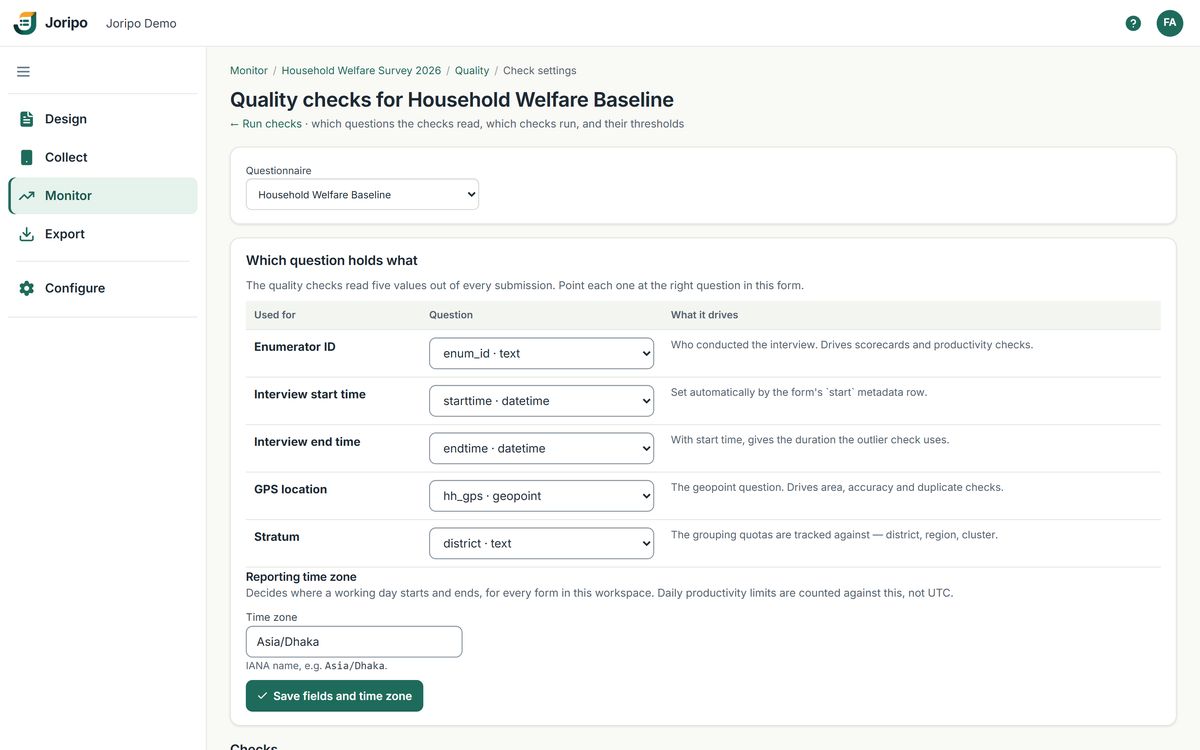
Tell Joripo which question holds what.
Joripo reads the deployed form and works out which questions hold the enumerator ID, the start and end time, the GPS location and the stratum. It shows what it inferred and a manager corrects it. A reporting time zone decides when a working day starts and ends. Scorecards, duration, GPS and quota tracking all rely on this mapping.
- Defaults follow common high frequency check practice, and every threshold can be changed
- Sample lists upload as CSV, TSV, Excel or Stata .dta
- Saving creates a new version of the rule-set, so old findings stay explainable
Choose the checks, then run them over the form.
On Run quality checks, tick any of the 28 checks and run them over everything the form has collected so far. Each check shows whether it is ready or still needs a question mapped, and recent runs stay listed with their results.
[{"field": "hh_size", "soft_min": 1, "soft_max": 15, "hard_min": 1, "hard_max": 40}]. There is no visual rule builder yet.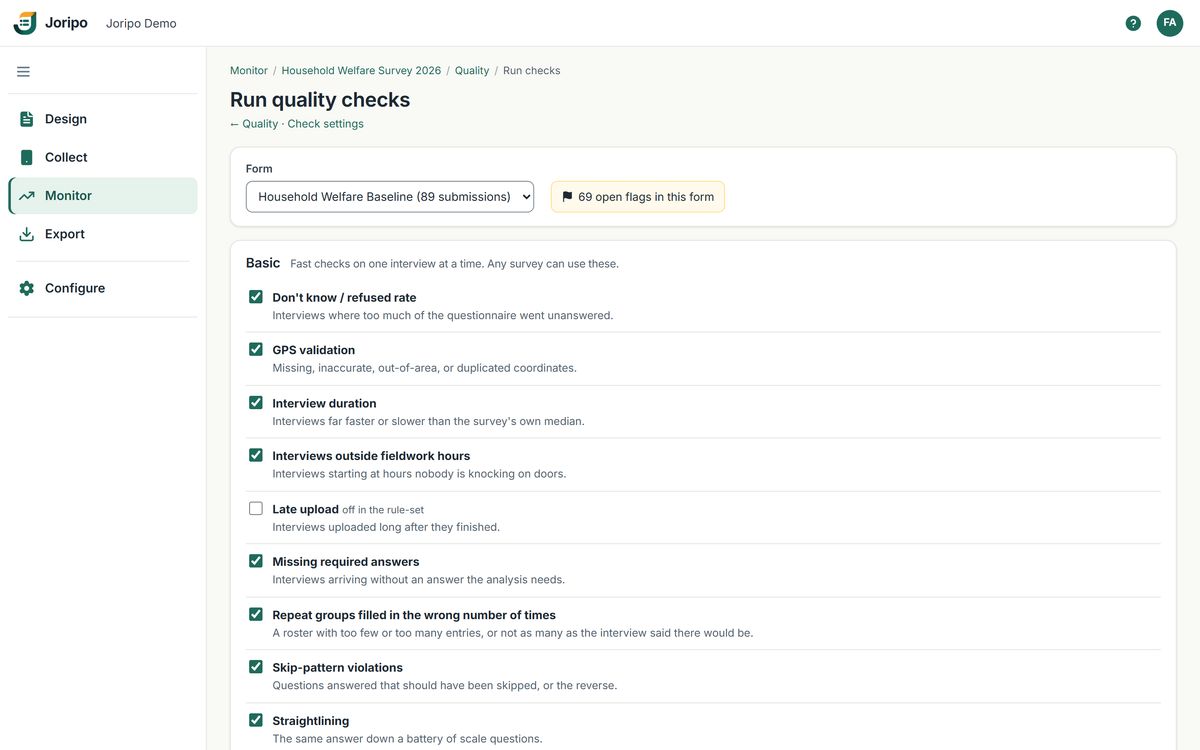
Verification and paradata
Back-checks, sample coverage, text audits and audio audits.
The evidence a supervisor needs to confirm a suspicion, and the reports an analyst needs to document what was found.
Back-checks and sample coverage
Back-check comparison matches a separate back-check form to the original interviews on a shared household or respondent ID. Choose which questions to compare: exactly, as categories, within a numeric tolerance or within a number of days.
- Flags interviews whose back-check disagrees on too many questions
- Flags any question, enumerator or back-checker whose disagreement rate passes the limit, once enough households are back-checked
- Sample coverage lists sampled units with no interview, and interviews not on your list, by cluster or ward if you choose
- Your team still selects the households to back-check and assigns the visits; Joripo does the comparison
Text audits and audio audits
Joripo Collect and web forms write text audits in the SurveyCTO-compatible format. The server turns them into one readable workbook with a summary per submission, time per field and the event log, or a zip of the raw files.
- Audio audits record in the background while the interview runs, for every interview or a sampled share
- Recordings play on the submission page and in the Data Explorer, and download in the attachments zip
- Time per section appears in the quality report when a form has a text audit
- Audio is captured and played back only: there is no transcription or automatic analysis
Quality report (.xlsx)
Per form: every finding with its status, reviewer, note and technical details; indicators with numerators and denominators; enumerator by day; and time per section.
n_flagsin exportsThe Joripo export layout carries a count of findings for each submission, so
keep if n_flags == 0in Stata sets flagged interviews aside.Findings for the whole workspace
Download every finding in a workspace as CSV or Excel, to share with the field team or file with the data.
Sensitive questions
Garbling for sensitive yes/no questions.
For a randomly chosen share of respondents, a No is recorded as Yes, so a recorded Yes never proves what one person said. Joripo then estimates the share answering Yes for the sample and for subgroups, with standard errors.
- IID garbling needs no roster; Block garbling assigns an exact share within each block, from a roster or in interview order
- With direct capture the enumerator records the plain answer and Joripo garbles it on arrival, so nothing about garbling is on the phone
- The secret seed, roster and keys are kept in an AES-256-GCM vault that only named key custodians can open
- A form check stops you freezing a scheme that would leak answers through relevance, calculations, labels or audio audits
- Simulations with up to 20,000 synthetic respondents before fieldwork
Garbling covers yes/no questions only. Its result is an estimated share answering Yes, not a true prevalence, and assumes nobody falsely reports Yes.
Common questions
Before you rely on the checks
Does Joripo send alerts when a critical finding appears?
Not today. Joripo does not send email, SMS or any other notification about findings. The findings list on each workspace's Quality page refreshes every 15 seconds, and the organisation's Monitor page has a Needs attention feed of critical and open findings.
Do all 28 checks run on every interview?
No. Twelve run on each interview as it arrives. The other sixteen compare across the whole dataset and run when an owner or manager clicks Run; there are no scheduled runs.
Do the checks work with ODK Collect and web forms?
Yes. The checks on arrival run on submissions from Joripo Collect, ODK Collect and web forms alike, and the on-demand checks run over everything a form has collected.
Can we write our own checks?
You configure the 28 built-in checks: their questions, thresholds and rules. A new kind of check needs a change in Joripo itself, so tell us what your team checks today.
Can reviewers correct answers in Joripo?
No. Reviewers resolve, dismiss and re-open findings; answers are not edited in the console. Export the data with its n_flags column and make corrections in Stata, R or Python.
Are some checks only on higher plans?
No. Every paid plan has all 28 checks on every submission. The Free plan has all 28 too, on its first 200 submissions a month. See Pricing.
Bring the checks your team runs today.
Show us the high frequency checks you run in Stata or R and a recent questionnaire, and we will walk through how Joripo would check it while fieldwork is under way.
Already using Joripo? Log in to your server.