 Joripo
Case management
Go back to the same households, round after round.
Panel surveys, follow-ups and listing studies return to people you have already met. Joripo keeps a case list for each workspace, sends every enumerator their own cases in Joripo Collect, and counts one completed interview per case, per form, per round.
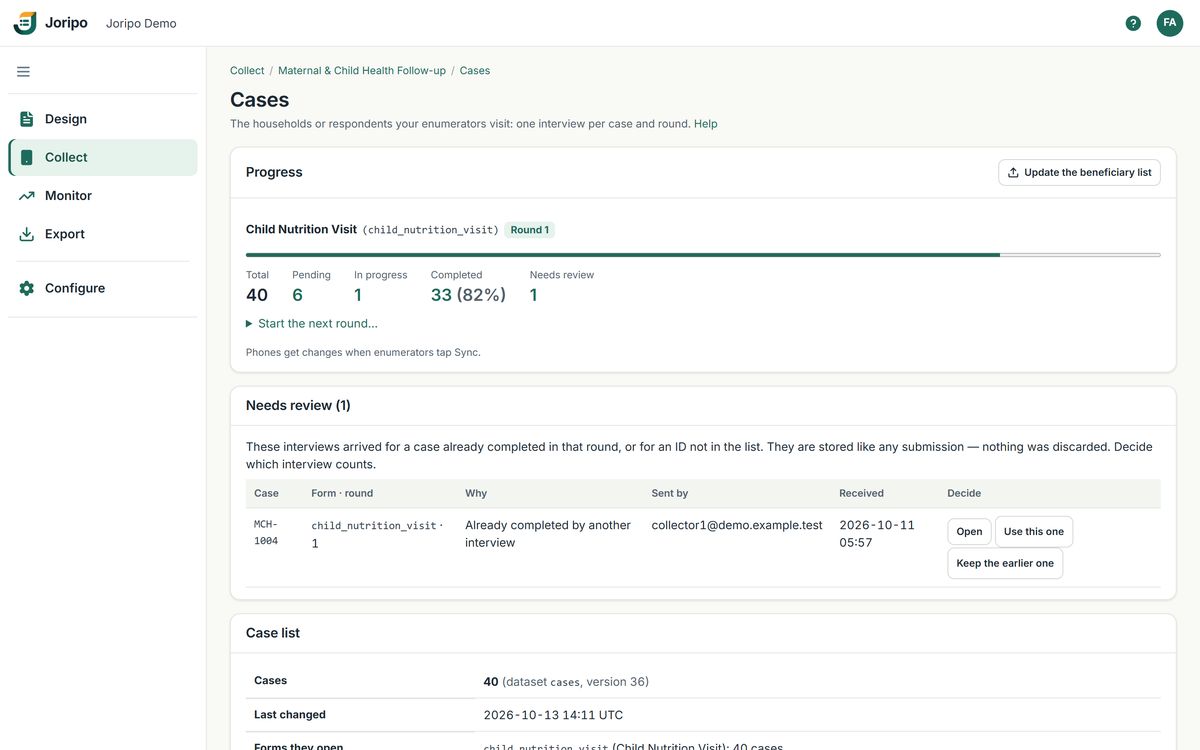
Joripo's console, showing a demo workspace with synthetic data.
Why it matters
Follow-up fieldwork goes wrong in familiar ways.
Two enumerators knock on the same door. A midline interview is mistaken for the baseline. A mistyped ID creates a household nobody sampled. The field coordinator rebuilds every enumerator's worklist in a spreadsheet each week. Case management is how Joripo keeps a revisit study straight.
One door, one visit
Opening a case on the phone claims it, so two enumerators are not sent to the same respondent.
Rounds kept apart
Each round makes every case due again, and earlier rounds' interviews stay stored.
IDs checked first
A list with a missing or repeated ID is refused before anything reaches a phone.
Worklists from the list
Each enumerator gets the cases assigned to them, refreshed the next time their phone syncs.
How it works
From a beneficiary spreadsheet to a worklist on every phone.
- Import your beneficiary listUpload any CSV or XLSX list with one row per case, or use a server dataset you already have. The setup wizard guesses which column is the ID and which is the label, and you choose the form.
- IDs are checked before importIf an ID is missing or repeated, the import is refused and nothing is written. Re-importing later merges on the ID and never resets a case's progress.
- Assign the casesTo everyone, to the people named in a column of emails or usernames, or to the enumerators you pick.
- Enumerators open Manage casesJoripo Collect downloads each enumerator's own cases. Opening one claims it on the server and fills in the form's case ID.
- The server decides completionA case is completed when its interview reaches the server, not when a phone says so. Progress shows pending, in progress and completed for each form.
- Start the next roundEvery case becomes due again for the next wave. A second interview of a case already completed in the round is kept and listed under Needs review.
The case list's other columns (village, phone, head of household) travel with it: forms can read them with pulldata() and search(), and mapped answers can update them, or add new cases from a listing form.
On the phone
Manage cases in Joripo Collect.
Enumerators see their own worklist with to-do and completed counts and the round name, and can search, switch between My cases and All cases, and show closed cases.
- The last case list stays on the phone for offline work, and an unchanged list costs almost nothing to check again
- Claiming needs a connection; offline, a case opens at once and the claim is settled at the next sync
- An interview already started resumes as a draft instead of becoming a second interview
- A finalized interview hides the case on that phone and records the case and round in the submission
Progress and review
See where every case stands, and settle the doubtful ones.
The Cases page shows each case form in its current round, with a progress bar and the cases filtered by state. Nothing that arrives is thrown away.
Progress per form and round
Total, pending, in progress, completed and needs review, for the round under way. The case table filters by the same states.
Needs review
An interview for a case already completed in the round, or for an ID not on the list, is stored like any submission and waits here. Choose "Use this one" or keep the earlier one.
Release and Reopen
Managers can release a claim that is still in progress, or reopen a case that was completed.
Update the list mid-fieldwork
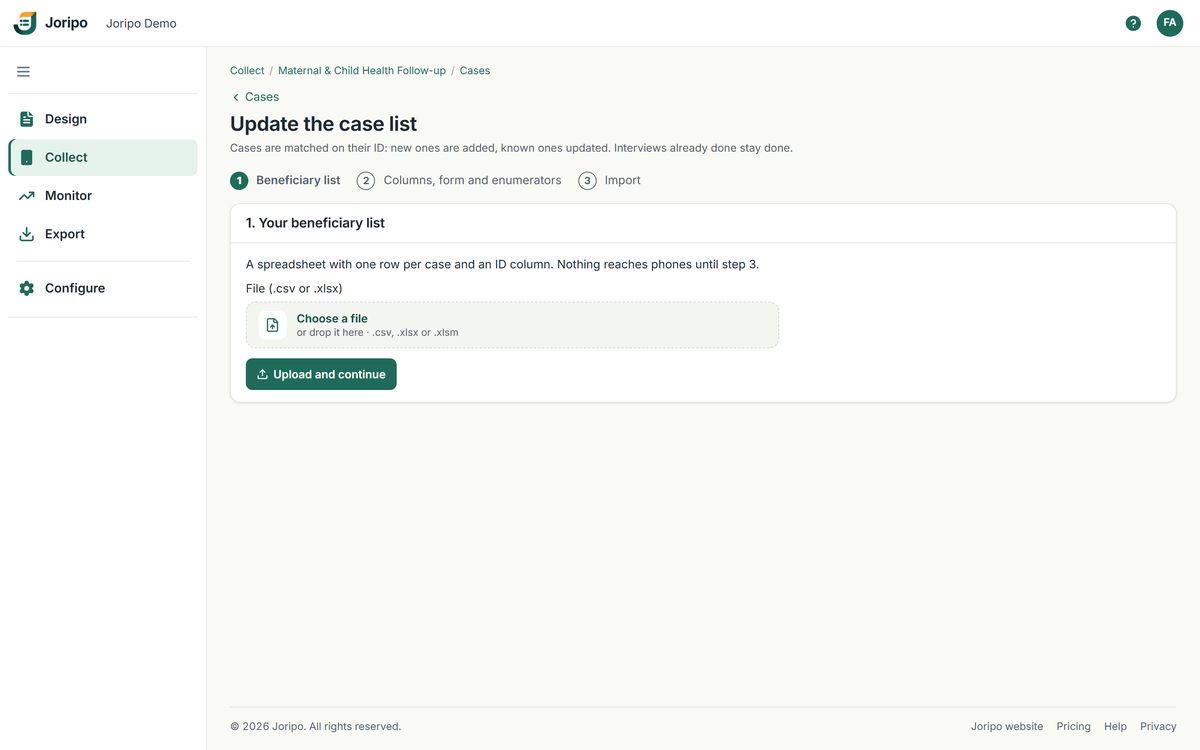
Bring a new version of the beneficiary list: cases are matched on their ID, new ones are added, known ones updated, and interviews already done stay done.
Rules and limits
The rules, stated plainly.
Case management is deliberately strict. Here is exactly what it does and does not do.
| Completion | One completed interview per case, per form, per round. This is the only mode. |
|---|---|
| Who decides | The server, when a submission arrives. Phones never edit a case. |
| Claims | A claim lasts 24 hours and never blocks a submission. A manager can release it sooner. |
| Second interviews | Kept, never discarded, and listed under Needs review until an owner or manager decides which one counts. |
| Imports | Refused with nothing written when an ID is missing or repeated. Re-imports merge on the ID and never reset progress. Case IDs can be up to 200 characters. |
| Who manages cases | Owners and managers. Reviewers cannot open the Cases page. An outside partner given the Data manager role on a shared workspace can also manage its case list. |
| Apps | The Manage cases worklist, claims and round stamping are in Joripo Collect for Android only. ODK Collect and web forms have no worklist. |
Typical uses
Studies that come back to the same people and places.

Household panels
Import the baseline sample as the case list, then start a new round for the midline and the endline. Each wave's interviews stay separate.

Maternal and child health follow-up
Repeated visits to the same mothers and children, with the details each enumerator needs carried on the case list.

School and facility visits
A list of schools or clinics visited once per round, each assigned through a column naming the enumerator who covers it.
Common questions
About case management
Do enumerators need a connection to work through their cases?
Only to download the list and to claim a case. The list stays on the phone, a case opens offline, and the claim is settled at the next sync. Finalized interviews send when a connection returns.
What happens if two enumerators interview the same household?
Both interviews are kept. The first to reach the server completes the case; the second is listed under Needs review, where an owner or manager chooses which one counts.
Can we change the list during fieldwork?
Yes. Upload a new version of the beneficiary list; cases are matched on their ID, new ones are added, and progress is never reset.
Can enumerators use ODK Collect or web forms for cases?
They can still submit the form, but the worklist, claims and round stamping are only in Joripo Collect for Android. For a case study, plan on Joripo Collect.
Does case management cost extra?
No. Case management is included on every plan. See Pricing.
Planning a panel or follow-up study?
Send us the layout of your beneficiary list and your follow-up form, and we will show you how the case list, rounds and worklists would work for it.
Already using Joripo? Log in to your server.